Per-strategy rulebooks
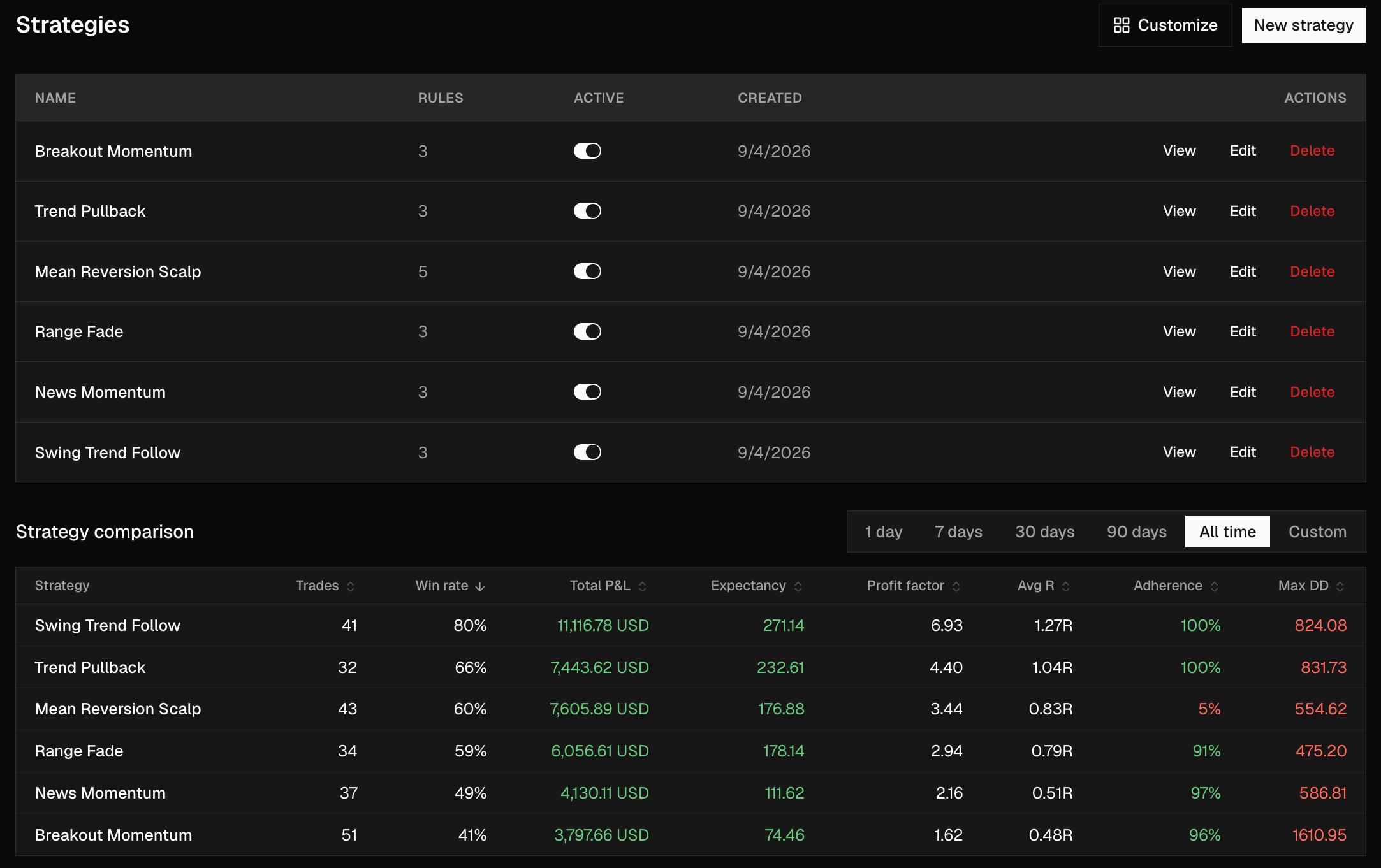
Every strategy is a named rulebook with its own risk caps, trade windows, and R:R minimums.

— Warren Buffett
Every fill scored for MFE / MAE and R-multiples. A rule engine flags the trades where you broke your own playbook, and an AI coach reads the numbers for you.
Overview · Main account
Synced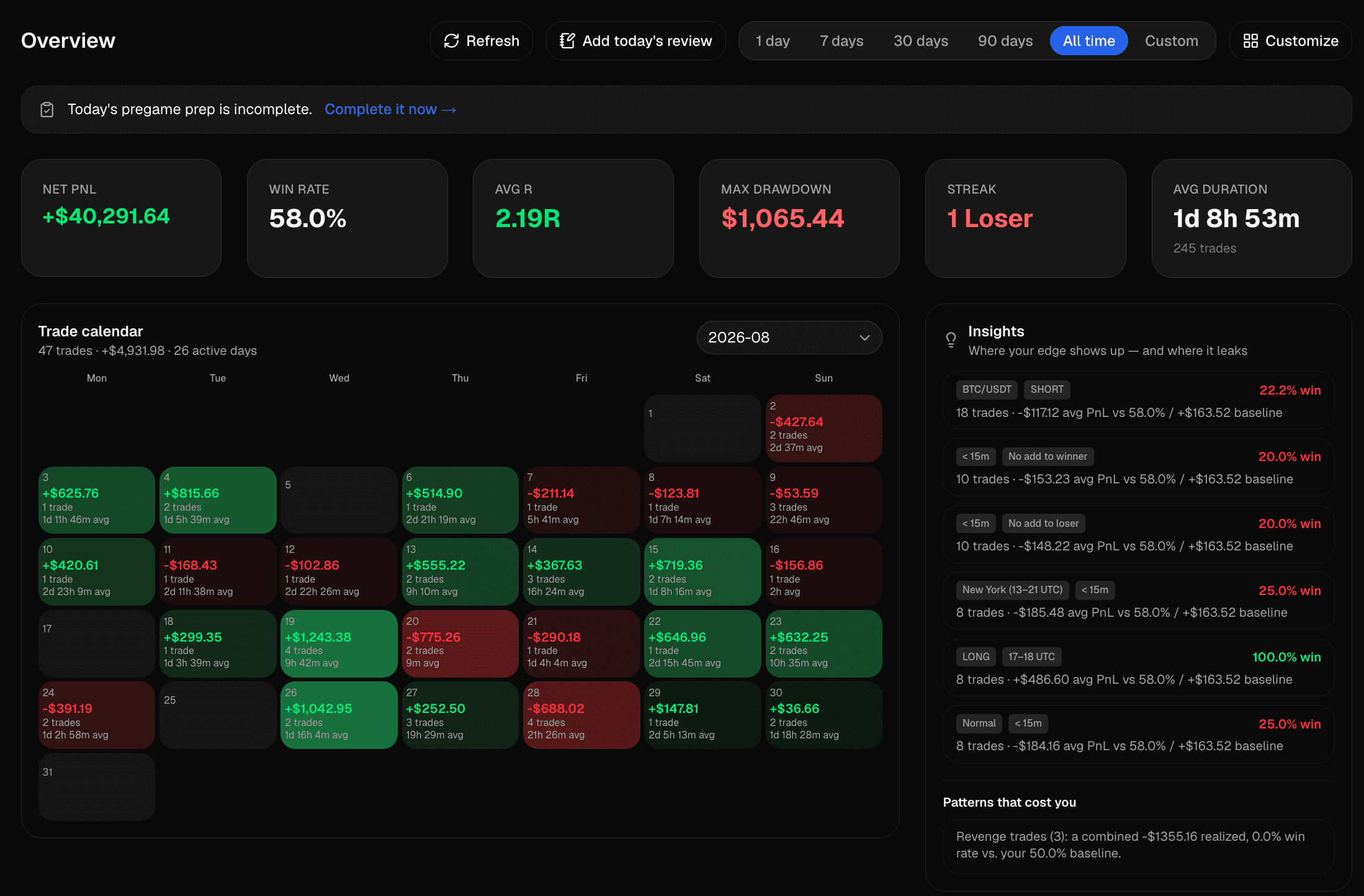
The in-app account overview.
Pre-launch
Alpha Journey isn't in production yet. Try it on your own trades and tell us what's wrong, missing, or useful.
0+
Trades synced
0
Venues live + roadmap
0
Rule types enforced
Multi-venue
Hyperliquid and Lighter sync live today, with eight more venues on the roadmap — and CSV import covers everything else meanwhile. Read-only API keys, KMS-encrypted at rest.
Binance
Crypto · Soon
Bybit
Crypto · Soon
Hyperliquid
Crypto
Lighter
Crypto
Extended
Crypto · Soon
MetaTrader 4
FX · Soon
MetaTrader 5
Multi · Soon
TradingView
Multi · Soon
Interactive Brokers
Equities · Soon
Trading212
Equities · Soon
Binance
Crypto · Soon
Bybit
Crypto · Soon
Hyperliquid
Crypto
Lighter
Crypto
Extended
Crypto · Soon
MetaTrader 4
FX · Soon
MetaTrader 5
Multi · Soon
TradingView
Multi · Soon
Interactive Brokers
Equities · Soon
Trading212
Equities · Soon
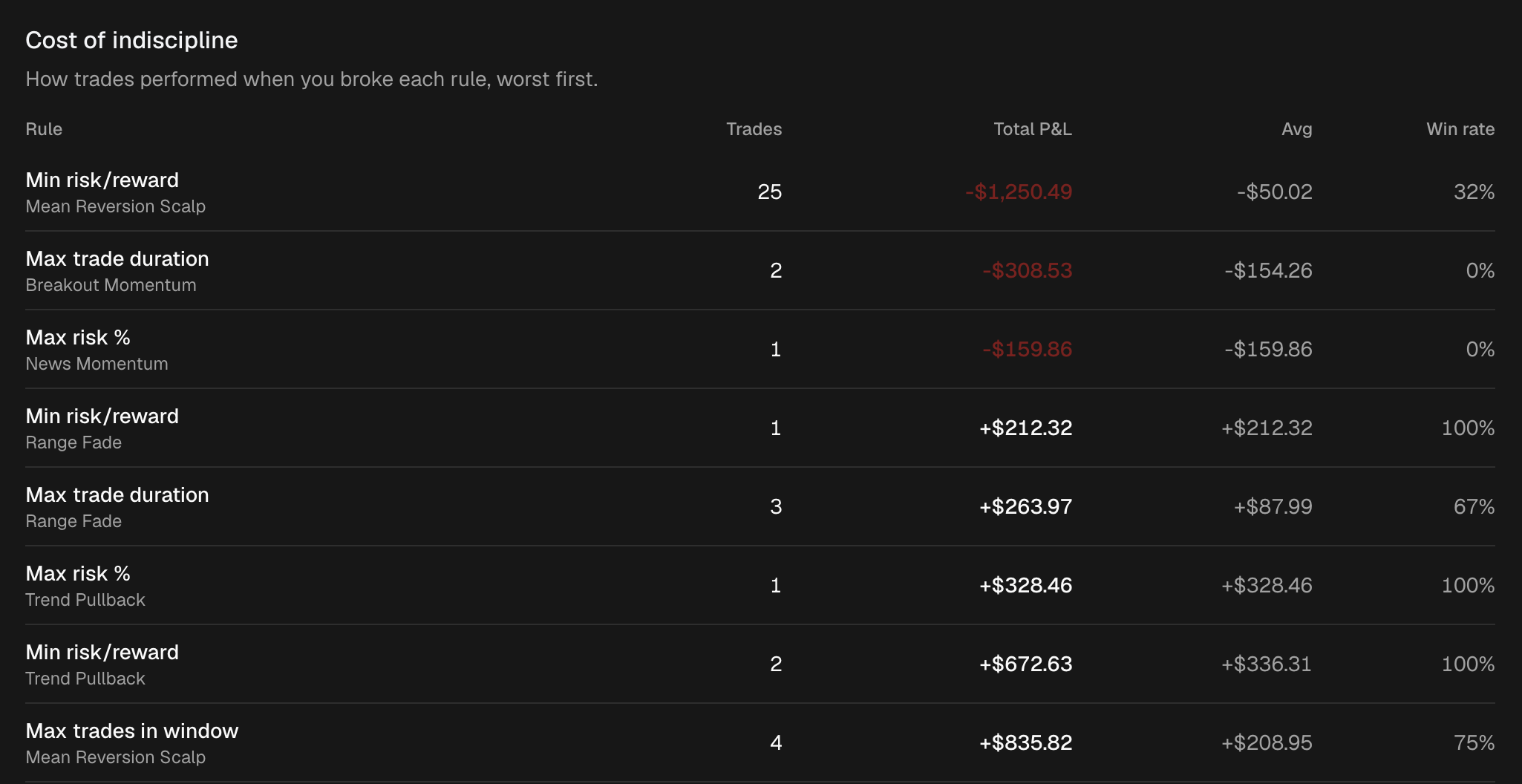
Discipline engine
Define each strategy as a rulebook. Every closed trade is checked against it automatically.
Every strategy is a named rulebook with its own risk caps, trade windows, and R:R minimums.
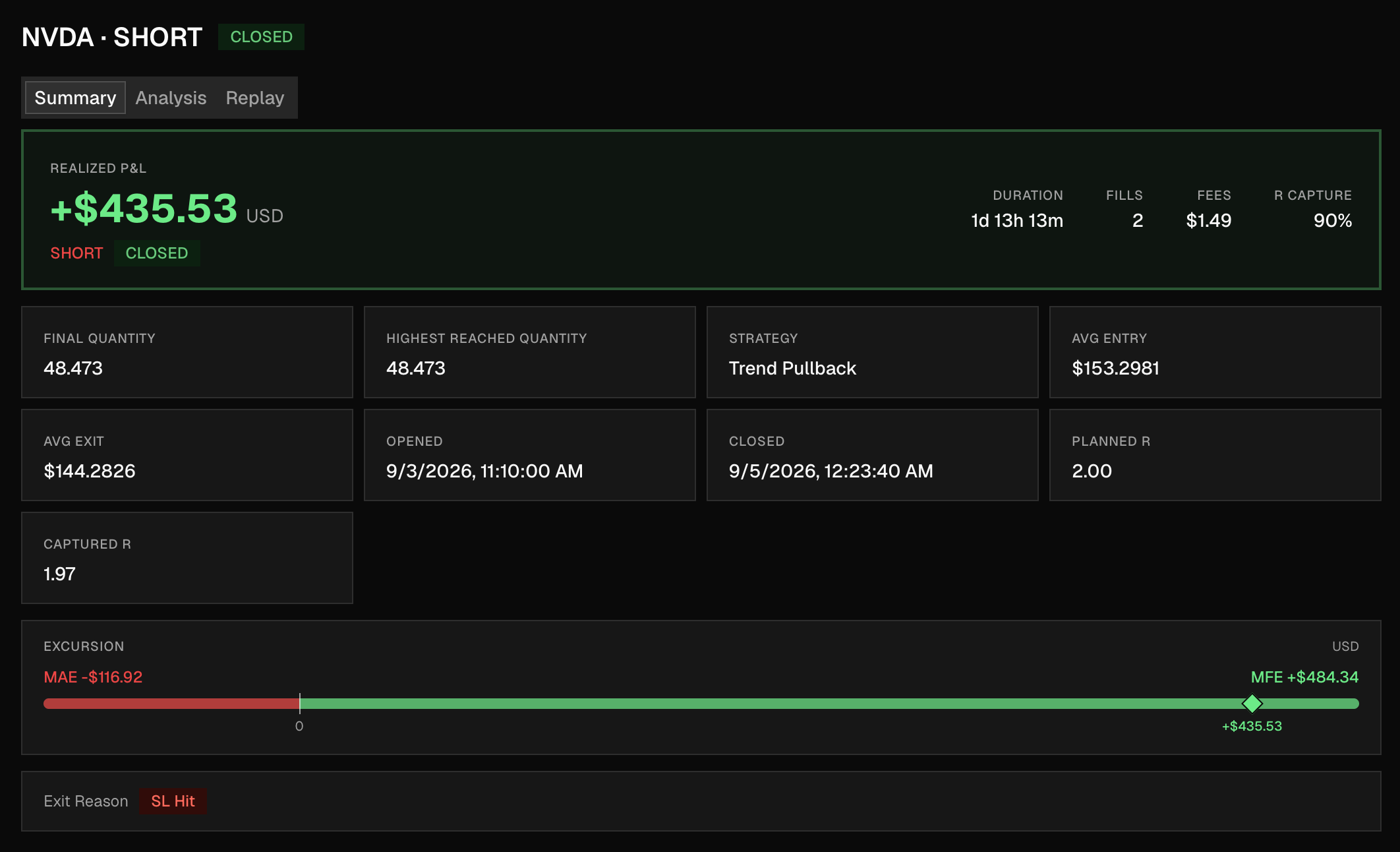
Each strategy shows its rules next to win rate, expectancy, profit factor, and how often you followed the plan.
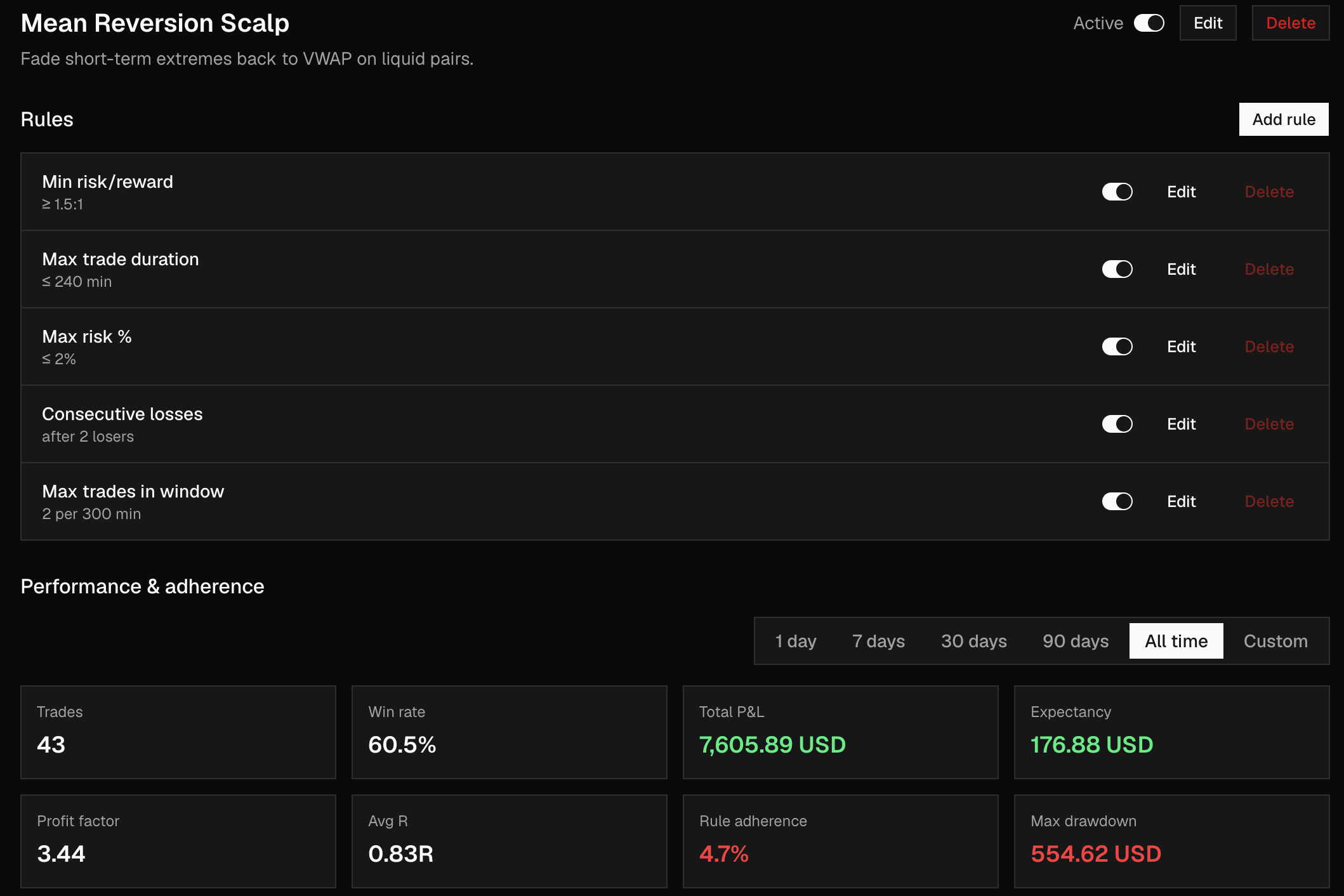
Each closed trade is scored pass/fail per rule, with an adherence % you can't fudge.
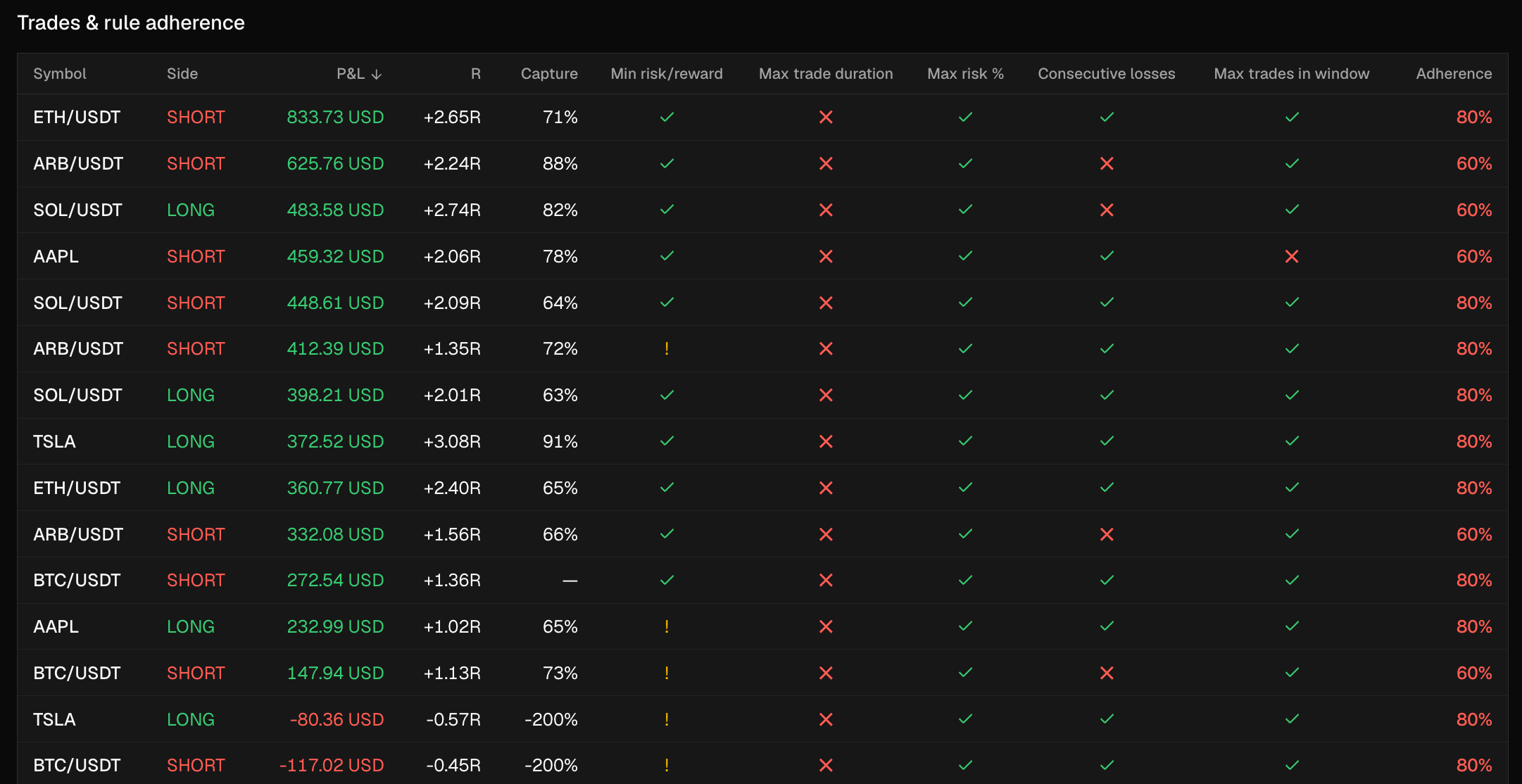
Which broken rule actually cost you money, ranked worst first.
Replay & backtest
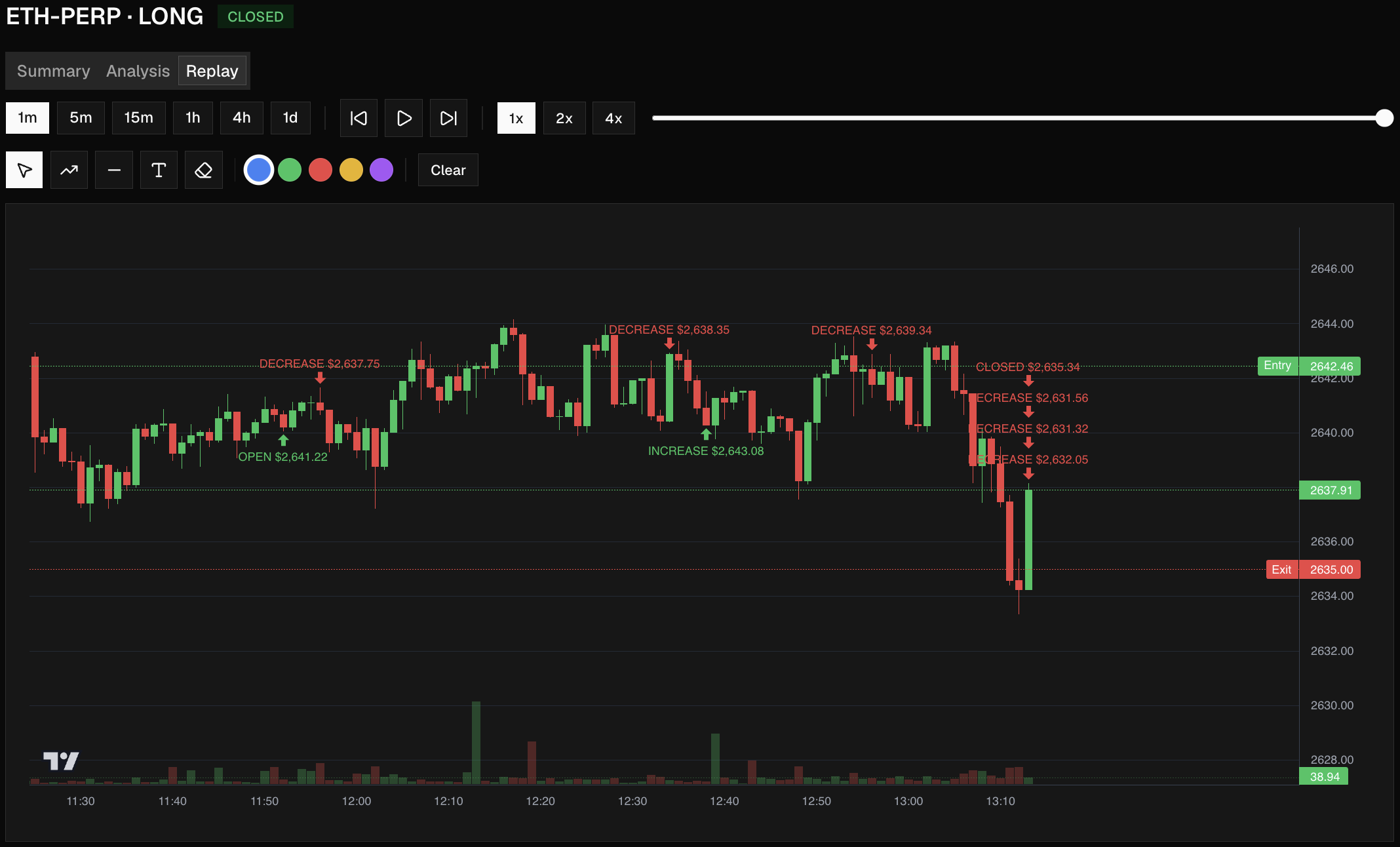
Every closed trade replays over the candles you traded, with your entry, stop, exit, and notes pinned to the moment.
Trade replay
Step through every fill and adverse excursion of a closed trade on real historical candles.
Backtest simulator
Re-run your setups against historical data with the same overlay engine, straight from the Backtest tab.
Annotations in context
Your notes, screenshots, and drawings pinned to the exact moment — your thesis, replayed alongside the price.
Replay view
Summary tab
Tilt Watch
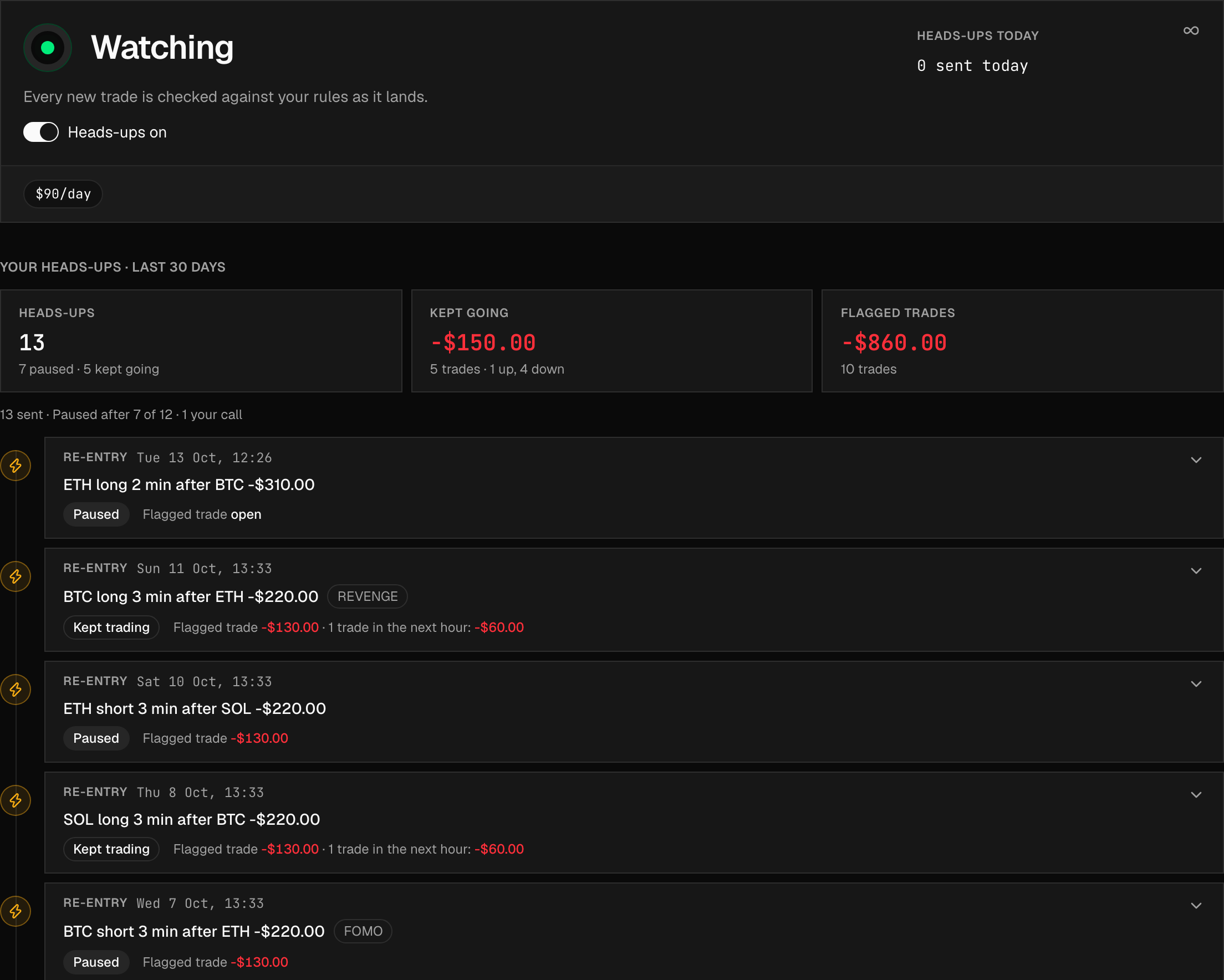
Tilt Watch checks every new trade against your rules as it lands and messages you when something looks off.
A heads-up in your chat
When a new trade breaks one of your rules or looks like revenge, you get a message while the position is still open.
Never touches your trades
It doesn't block, close or change anything. You decide whether to pause or keep going.
See what each heads-up cost
Every heads-up is logged with what you did next, and what the flagged trades and the ones after them made or lost.
AI coach
The AI coach reads your trades, tags, and notes. Ask anything that takes a spreadsheet today and get an answer in seconds.
You
Why am I losing on ETH longs after 14:00 UTC?
Alpha Journey · Coach
Thinking…
Edge Finder
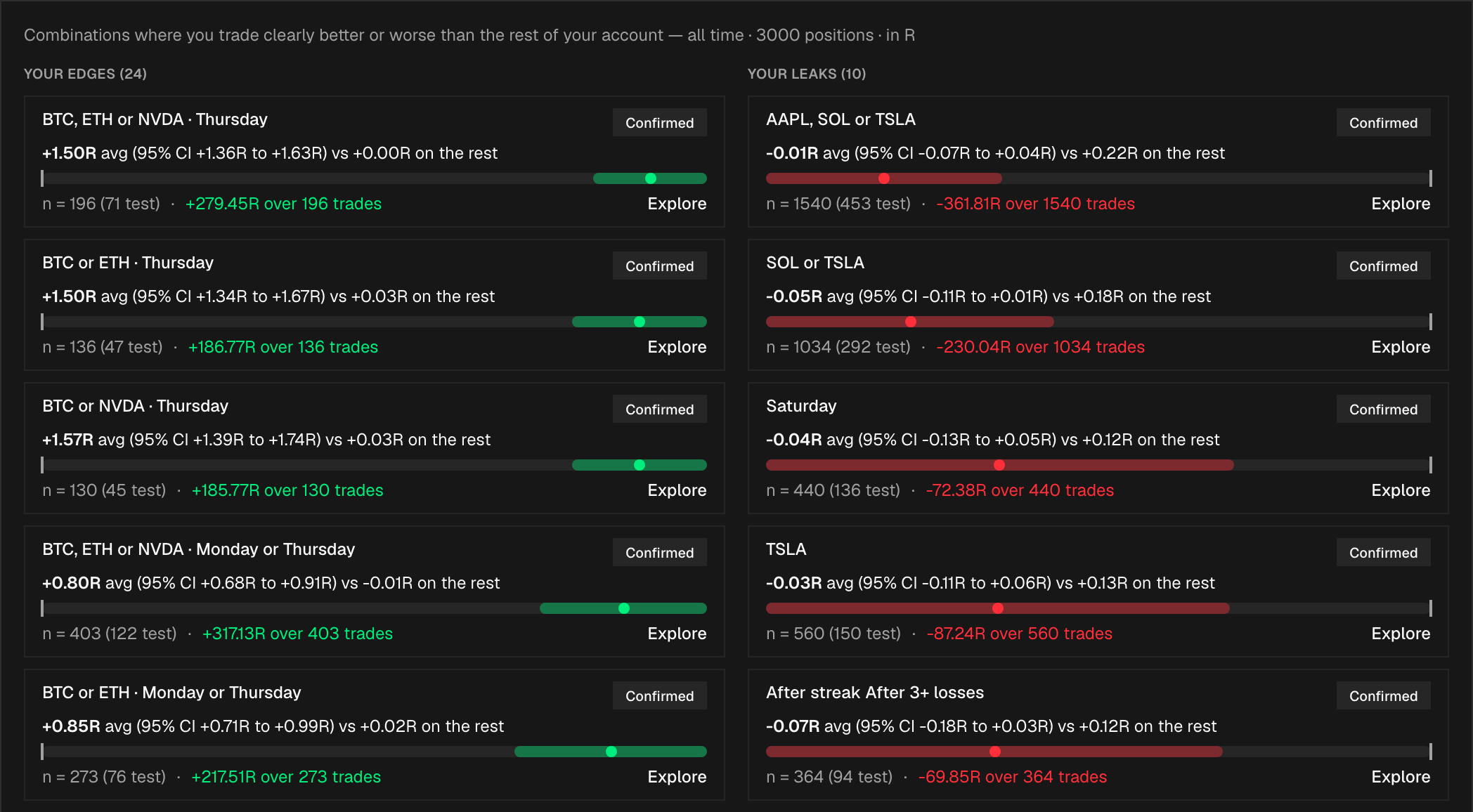
Edge Finder scans every closed trade for the setups where you trade clearly better — or worse — than the rest of your account.
Combinations, not single stats
Searches up to three conditions at once — symbol, weekday, session, hour, streak, holding time — including groups like “BTC, ETH or NVDA”.
Checked on trades it hasn't seen
Each finding is re-tested on your newest 30% of trades. Only the ones that hold up are marked Confirmed.
Your edges and your leaks
Ranked by what they actually made or cost you, with one click to explore any slice in detail.
Everything else
A structured journal alongside the numbers — session notes, lessons, and reviews linked to the trades of the day.
Attach chart screenshots and written notes to any trade. They resurface in replay at the right moment — your thesis, in context.
Threshold alerts on your metrics — email and in-app — plus org-level alert webhooks for wiring breaches into your own tooling.
No API for your venue yet? Import fills from CSV and get the same analytics, replay, and AI coverage as synced accounts.
Build and save your own chart views on the symbols you trade, right inside the journal.
For desks & teams
Admins get a dedicated toolkit for supervising funded traders and prop teams.
One admin view across every trader on the desk — P&L, activity, and behaviour flags side by side.
Rank traders by the metrics that matter to your desk, not just raw P&L.
Set per-trader and desk-wide targets and track progress against them.
Desk-level risk limits and behaviour rules, with alert webhooks when someone crosses a line.
Invite traders by email, enforce an org password policy, and manage roles from one screen.
Every admin action recorded — who changed what, when, across the whole organization.
Pricing
FREE keeps you in 100 most-recent trades. Paid plans extend the rolling window, add exchange slots, and lift AI quotas.
Free
$0/mo
Journal your most recent 100 trades, free forever.
Pro
Only the first 1,000 usersRegular price $29Founding price $14/mo
Everything a serious discretionary trader needs.
Elite
Only the first 1,000 usersRegular price $55Founding price $29/mo
Unlimited history, unlimited venues.
Team
Only the first 1,000 usersRegular price $99Founding price $59 / seat / mo
From, 3-seat minimum
Everything in Elite, plus company-admin oversight for desks.
Only the first 1,000 users. Founding price is yours for as long as you stay subscribed. If you cancel, it can't be reclaimed. 7-day free trial, cancel anytime. Refund terms
FAQ
We use read-only API keys — never trading keys — and the same read-only model will apply to broker connections as they launch. Credentials are encrypted with AWS KMS envelope encryption at rest and never exposed in logs or responses. You can revoke a connection at any time and we tear down the cached sync state immediately.
They stay safe in the database — we just hide them from the UI, exports, and AI context until you upgrade. Upgrade and they reappear within seconds. Downgrade and they hide again. Nothing is ever deleted by a plan change.
Yes. Cancellations are processed through the Paddle customer portal and take effect at the end of your current billing cycle. You keep paid-tier access until then, after which you drop to FREE automatically.
Prompts and tool calls run inside our backend with your trades, tags, and emotion stamps as scoped context. We don't share trade data across orgs, and we don't use your trades to train upstream models. You can review every prompt in the Insights → History view.
Yes — full CSV + JSON export of trades, positions, screenshots metadata, notes, and AI conversation history. Available on every plan, including FREE. There's no proprietary lock-in.
Hyperliquid, Lighter, Extended, Binance, Bybit, Coinbase, OKX, Trading212, Kraken, Bitget, Kraken Futures, Crypto.com, Backpack and Robinhood Crypto sync live. IBKR, MT4 and MT5 are in beta. Trading Technologies (TT), TradingView and generic CSV imports cover any other venue with the same analytics, replay and AI coverage.
Free forever on your most recent 100 trades. No card, no friction, no lock-in. Sync your first exchange in under a minute.